
From F to A+: A Guide to Hugo & Netlify Security Headers
Technical Archive
This article discusses the previous version of this blog, which was built with Hugo. The site is now powered by Astro. While the security concepts explored here remain valid, specific implementation details related to Hugo no longer apply to the live site.
By diving into forums concerning Hugo (the static site generator built in Go that I use for this blog) and reading the official documentation, I regularly encountered the topic of security policy configuration. Consequently, I decided to audit and harden my blog’s security. In this post, I detail the journey that led me to raise this security to a satisfying level.
Before exploring the details, I must clarify that I am not a security expert. I did my best to understand the basics, and I hope this article proves helpful to you.
Measuring the Initial Security Level
Prerequisite: you must have a website deployed and available online. The tool I used to measure my website’s security score is Security Headers by Probely. Simply enter the website address you want to scan. After a few seconds, the tool displays a grade (ranging from F, symbolizing a terrible security level, to A+, the highest level). You can also scan other websites; you might be surprised by the low security levels of some well-known sites!
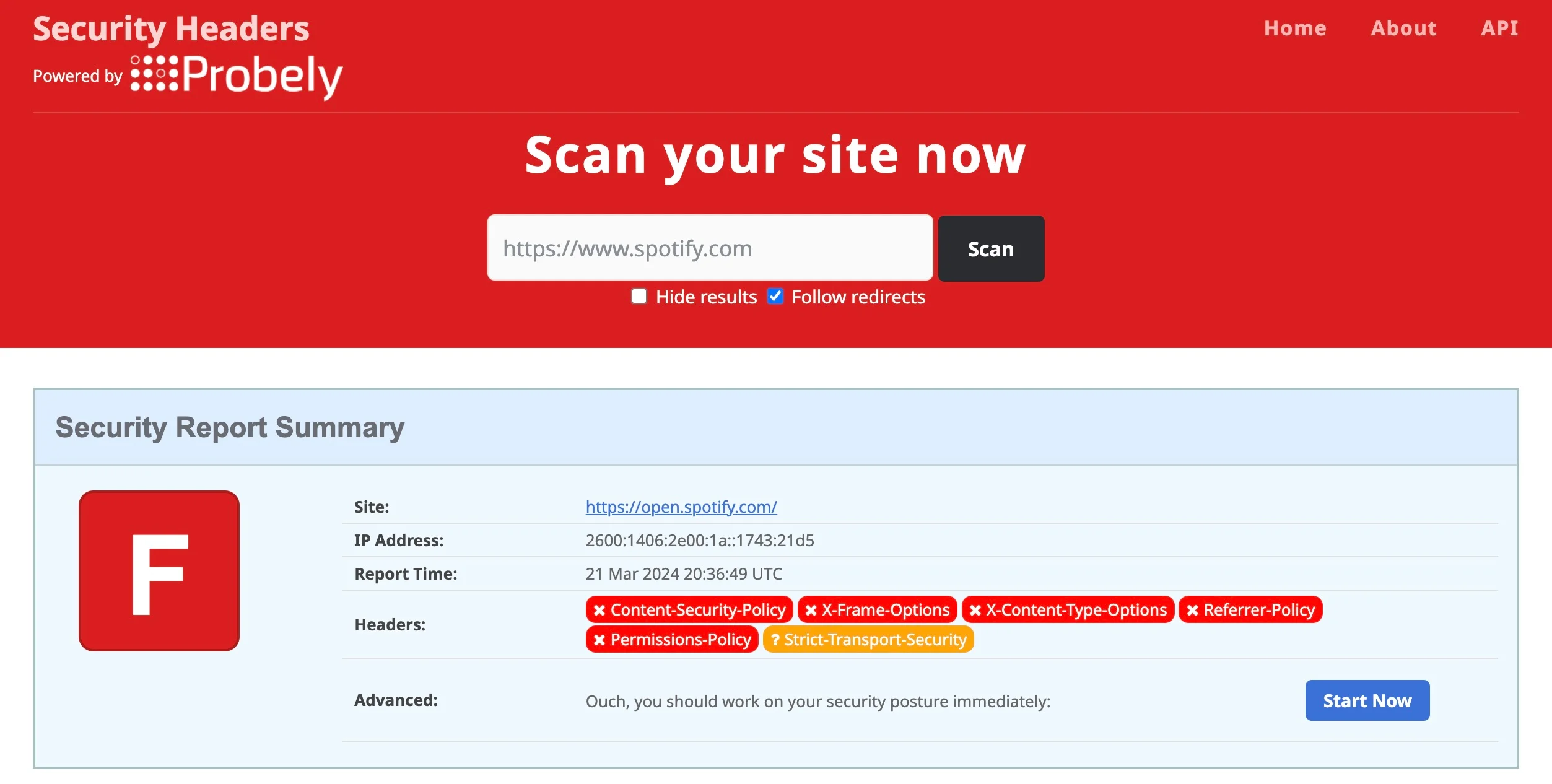 Scan applied to spotify.com
I launched the same analysis on my blog and obtained the following result:
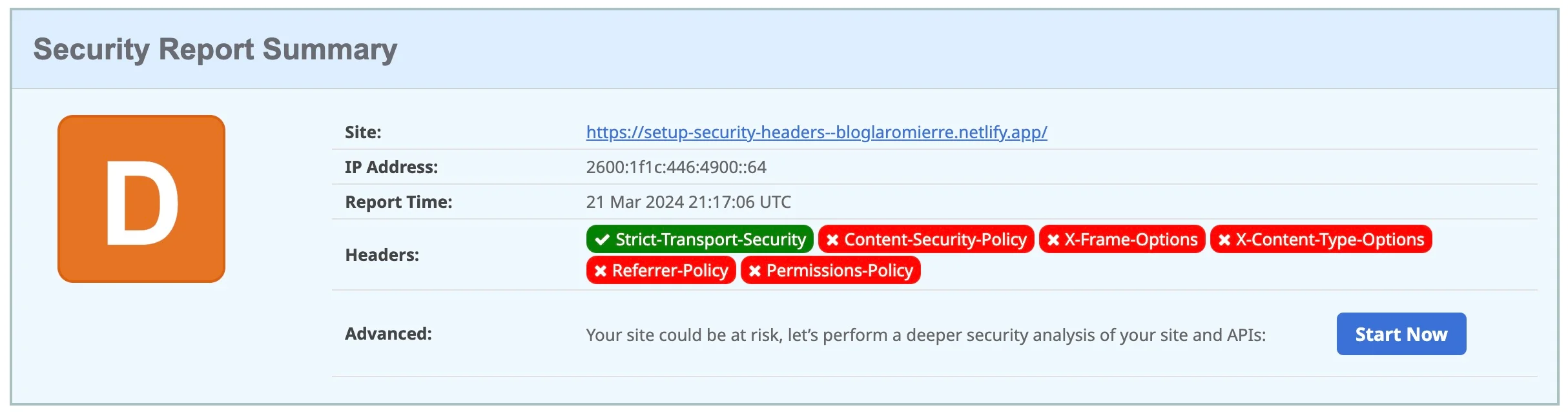 Initial analysis
I gathered some helpful information. First, the score was quite low (D). However, there was one positive point: the header "Strict-Transport-Security" was already set and valid. Without going too deep into the details (see this article), this header enforces the use of TLS in the web browser.
Now that we know where we stand, let’s see how to add the missing headers.
Basic Header Configuration
Looking at the configure server documentation page, there is a basic configuration for the development environment to add to config/development/server.toml:
[[headers]]
for = '/**'
[headers.values]
Content-Security-Policy = 'script-src localhost:1313'
Referrer-Policy = 'strict-origin-when-cross-origin'
X-Content-Type-Options = 'nosniff'
X-Frame-Options = 'DENY'
X-XSS-Protection = '1; mode=block'
Since this file is in a “development” package, it is intended for local use. I initially planned to create one file per environment. Unfortunately, Netlify ignores headers defined in this manner during the build process, regardless of whether you specify the environment with --environment=<the_environment> or place the server.toml file in configs/_default/.
I therefore chose to define production headers directly in the netlify.toml configuration file located at the root of my project. I kept the server.toml file for iterating in my local development environment. I recommend this article if you want to learn more about adding headers to this file.
Note: There is another way to configure these headers. I successfully tested defining headers in a static/_headers file for sites hosted on Netlify (see this documentation).
Adding Configuration to netlify.toml
Based on the “Basic Header Configuration,” the structure looks like this:
[[headers]]
for = '/**'
[headers.values]
...
[[headers]] starts the headers configuration block. for = '/**' indicates that the configuration applies to all paths on the website. Finally, [headers.values] begins the specific header definitions. You can define different headers for different paths as follows:
[[headers]]
for = '/**'
[headers.values]
...

/posts/**
[headers.values]
...

/articles/**
[headers.values]
...
I will now detail the different headers, their possible values, how I applied them, and the impact on the security ranking.
Permissions-Policy
This header specifies which features (like the camera, microphone, or geolocation) can be used on the website. More details are available on MDN Web Docs here. My blog doesn’t need any of these features. Consequently, I assign an empty allowlist () to each one. At this step, my netlify.toml file looks like this:
[[headers]]
for = '/**'
[headers.values]
Permissions-Policy = 'accelerometer=(self), camera=(), microphone=(), geolocation=()'
I applied the update, redeployed the site, and launched a new evaluation. Result:
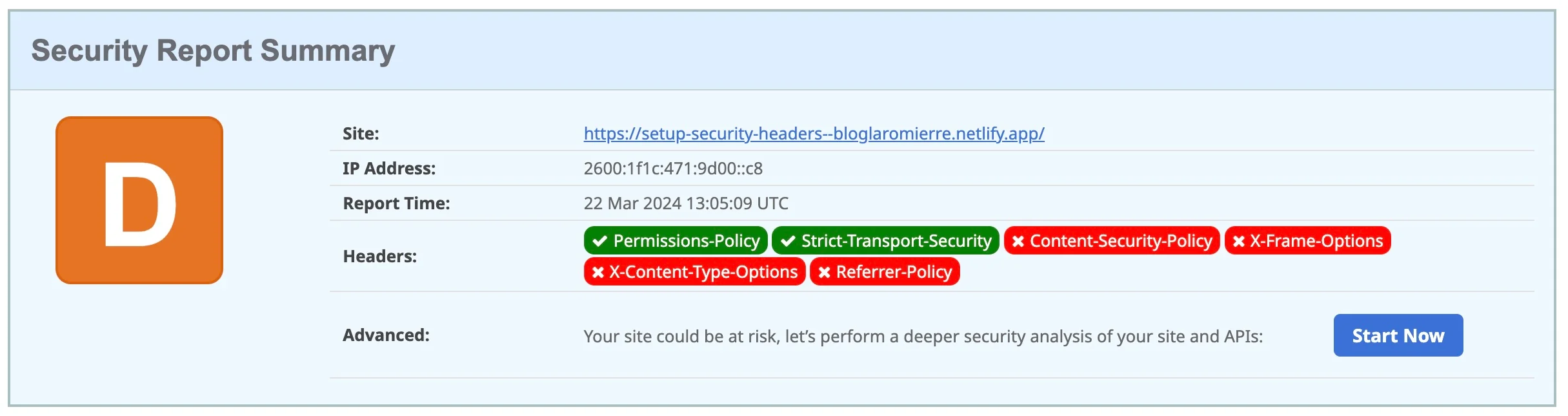
Analysis after adding the Permission-Policy header
Although I still have the same D ranking, the Permissions-Policy header has turned green—excellent news! This proves the configuration is active.
You can also validate headers using Google Chrome DevTools. Right-click > Inspect, then click the “Network” tab. Refresh the page, find the line matching your website’s URL (type “Document”), and click it to view the active Headers.
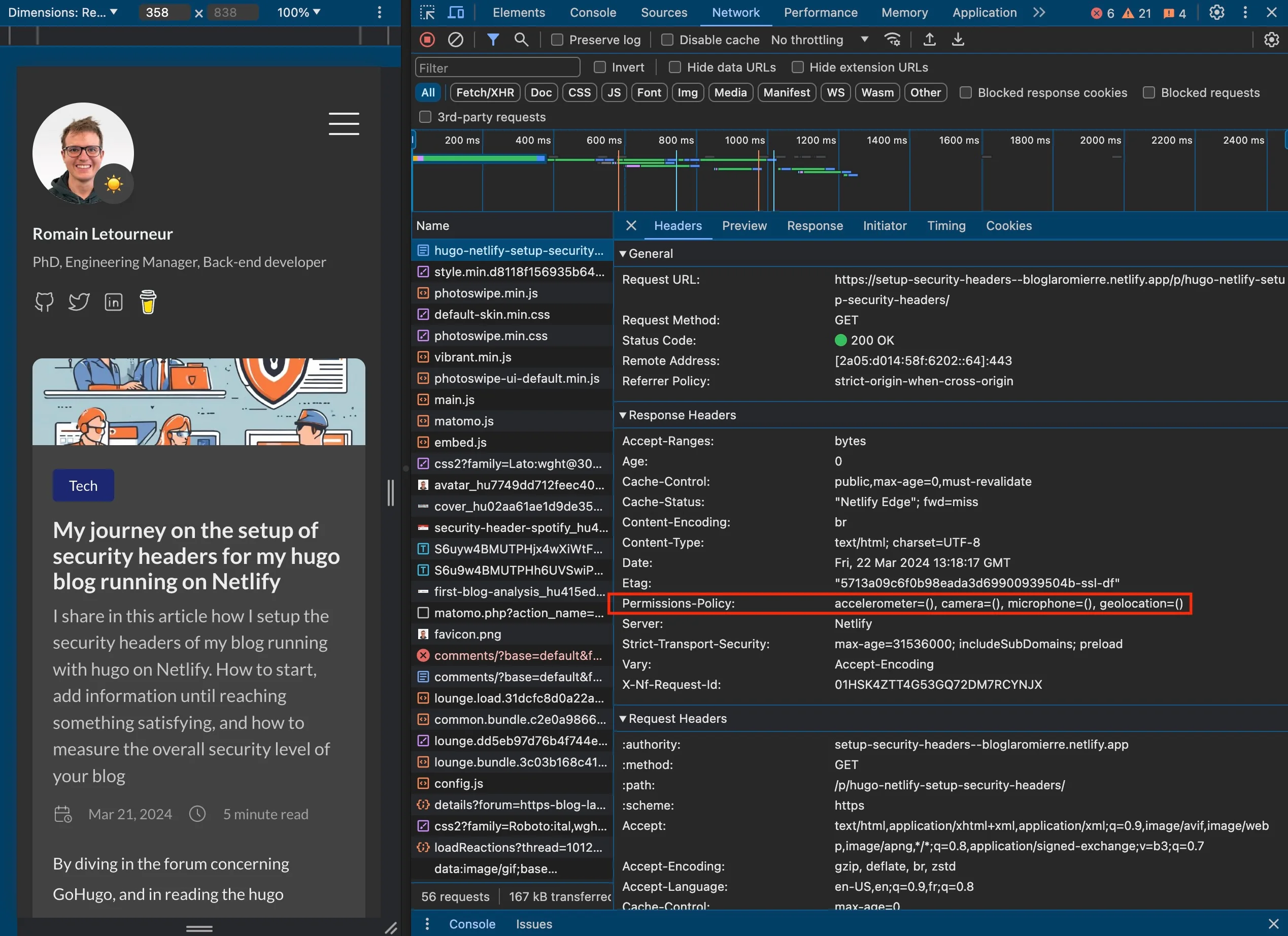 Google Chrome DevTools with the Permissions-Policy header highlighted
X-Frame-Options
These headers prevent the page from being rendered inside a <frame>, <iframe>, <embed>, or <object>. This protects visitors from clickjacking attacks, where invisible objects are overlaid on legitimate elements to steal sensitive information.
There are two valid options: SAME-ORIGIN (allows rendering only if the frame comes from the same origin) or DENY (blocks rendering regardless of origin). More details are available here. Since I don’t need to embed my site anywhere, I set it to DENY:
[[headers]]
for = '/**'
[headers.values]
Permissions-Policy = 'accelerometer=(self), camera=(), microphone=(), geolocation=()'
X-Frame-Options = 'DENY'
After redeploying, X-Frame-Options turned green, and I reached a C ranking.
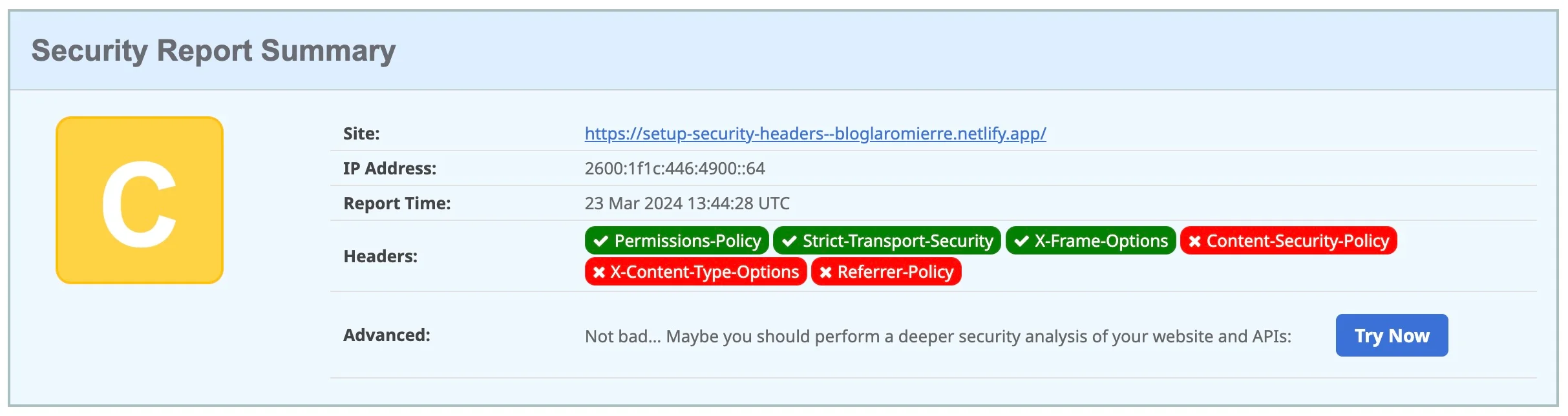 Analysis after adding the X-Frame-Options header
We are on the right track!
X-XSS-Protection
According to MDN Web Docs, X-XSS-Protection is a deprecated header intended to prevent cross-site scripting attacks. Unless you need to support legacy browsers, this header can be omitted in favor of a strong Content-Security-Policy (CSP) that deactivates inline JavaScript. As you will see, configuring CSP is a tricky mission…
X-Content-Type-Options
This header prevents the browser from “guessing” (sniffing) the Content-Type of a requested page. It has one major value: nosniff. Using nosniff is highly recommended to avoid MIME sniffing attacks. If an attacker sends a file with an incorrect content type (e.g., an image that actually contains a script), the browser might execute it if sniffing is allowed. More details here.
I added this header with the value nosniff:
[[headers]]
for = '/**'
[headers.values]
Permissions-Policy = 'accelerometer=(self), camera=(), microphone=(), geolocation=()'
X-Frame-Options = 'DENY'
X-Content-Type-Options = 'nosniff'
New evaluation:
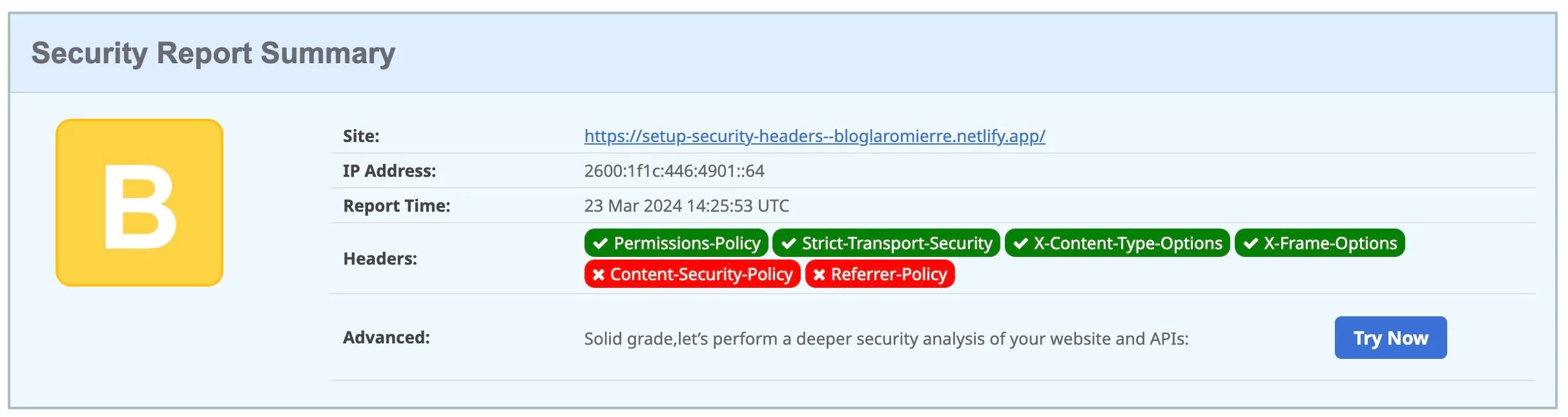 Analysis after adding the X-Content-Type_Options
With a B ranking, we are getting closer to the top score! Next up: Referrer-Policy.
Referrer-Policy
This header controls how much information about the “referrer” (the page the user is coming from) is included with requests. It determines what data is sent to the destination when a user clicks a link on your site (e.g., nothing, the base URL, the full path).
For my blog, I use the default value: strict-origin-when-cross-origin. This sends the origin, path, and query string for same-origin requests. For cross-origin requests, it sends only the origin, and only if the protocol security level is the same (HTTPS to HTTPS).
[[headers]]
for = '/**'
[headers.values]
Permissions-Policy = 'accelerometer=(self), camera=(), microphone=(), geolocation=()'
X-Frame-Options = 'DENY'
X-Content-Type-Options = 'nosniff'
Referrer-Policy = 'strict-origin-when-cross-origin'
A new check gave me the following result:
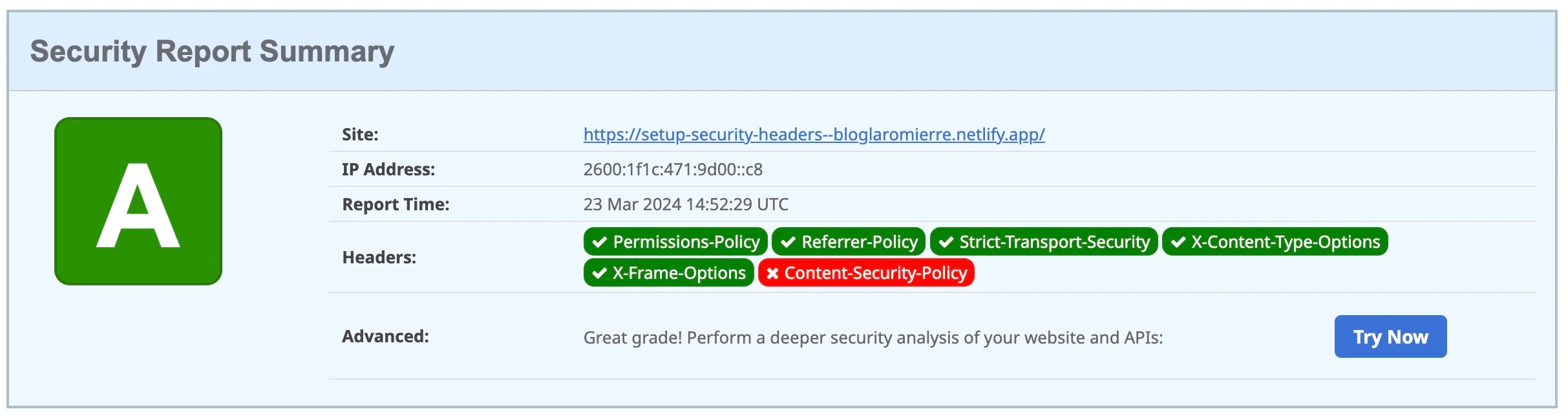 Analysis after adding the Referrer-Policy
Yay, it’s green! I have reached rank A! But we won’t stop there. Let’s aim for A+ with the final boss: Content-Security-Policy.
Content-Security-Policy (CSP)
Configuring this header finely can be a nightmare. Understanding and configuring it properly required hours of work, during which I had to abandon or replace certain 3rd-party tools. There is no generic configuration: a rigorous CSP will differ from one website to another, and even between environments!
I recommend using hugo server locally to check the effects of your changes. Use Google Chrome DevTools, which highlights CSP errors and offers suggestions.
Let’s start with the most restrictive values possible:
[[headers]]
for = '/**'
[headers.values]
Permissions-Policy = 'accelerometer=(self), camera=(), microphone=(), geolocation=()'
X-Frame-Options = 'DENY'
X-Content-Type-Options = 'nosniff'
Referrer-Policy = 'strict-origin-when-cross-origin'
Content-Security-Policy = "default-src 'none' ; script-src 'none' ; script-src-elem 'none' ; connect-src 'none' ;
img-src 'none' ; style-src 'none' ; style-src-elem 'none' ; base-uri 'none'; form-action 'none' ; font-src 'none' ; object-src 'none'"
A Note on Indentation
The Content-Security-Policy header contains many directives (default-src, script-src, etc.). To make it readable and maintainable, use multiline strings in TOML:
Content-Security-Policy = """
  default-src 'none';
  script-src 'none';
  script-src-elem 'none';
  connect-src 'none';
  img-src 'none';
  style-src 'none';
  style-src-elem 'none';
  base-uri 'none';
  form-action 'none';
  font-src 'none';
  object-src 'none'
"""
You can even go further by automating header generation. I recommend this article if you are interested.
After adding this configuration to netlify.toml and redeploying, I launched a new evaluation.
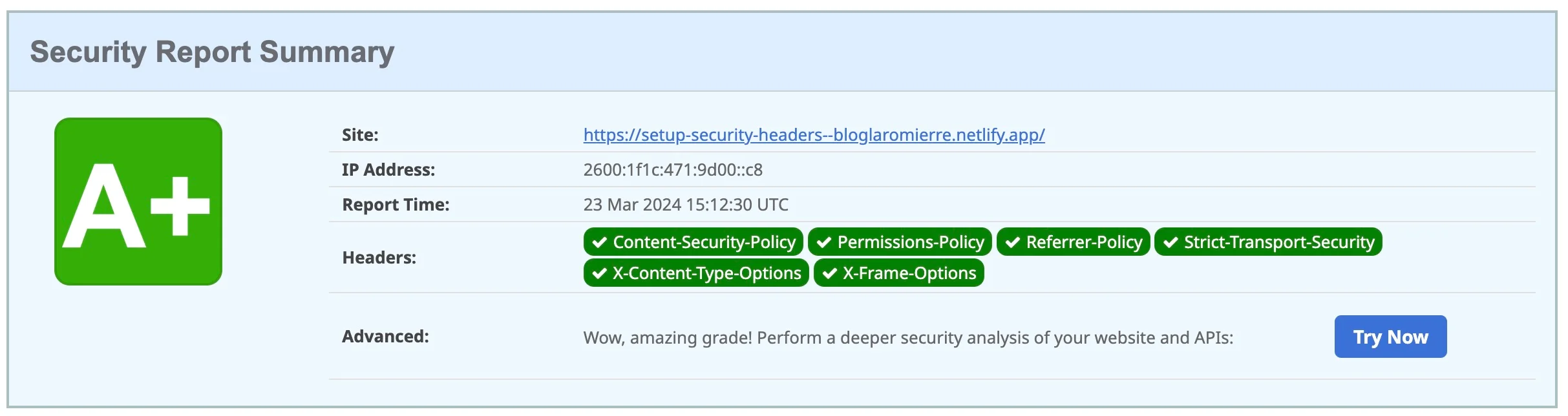 Analysis after adding the Content-Security-Policy
Yes! I did it! A+. The perfect ranking!
However, looking at my site, I noticed its appearance had changed “slightly.”
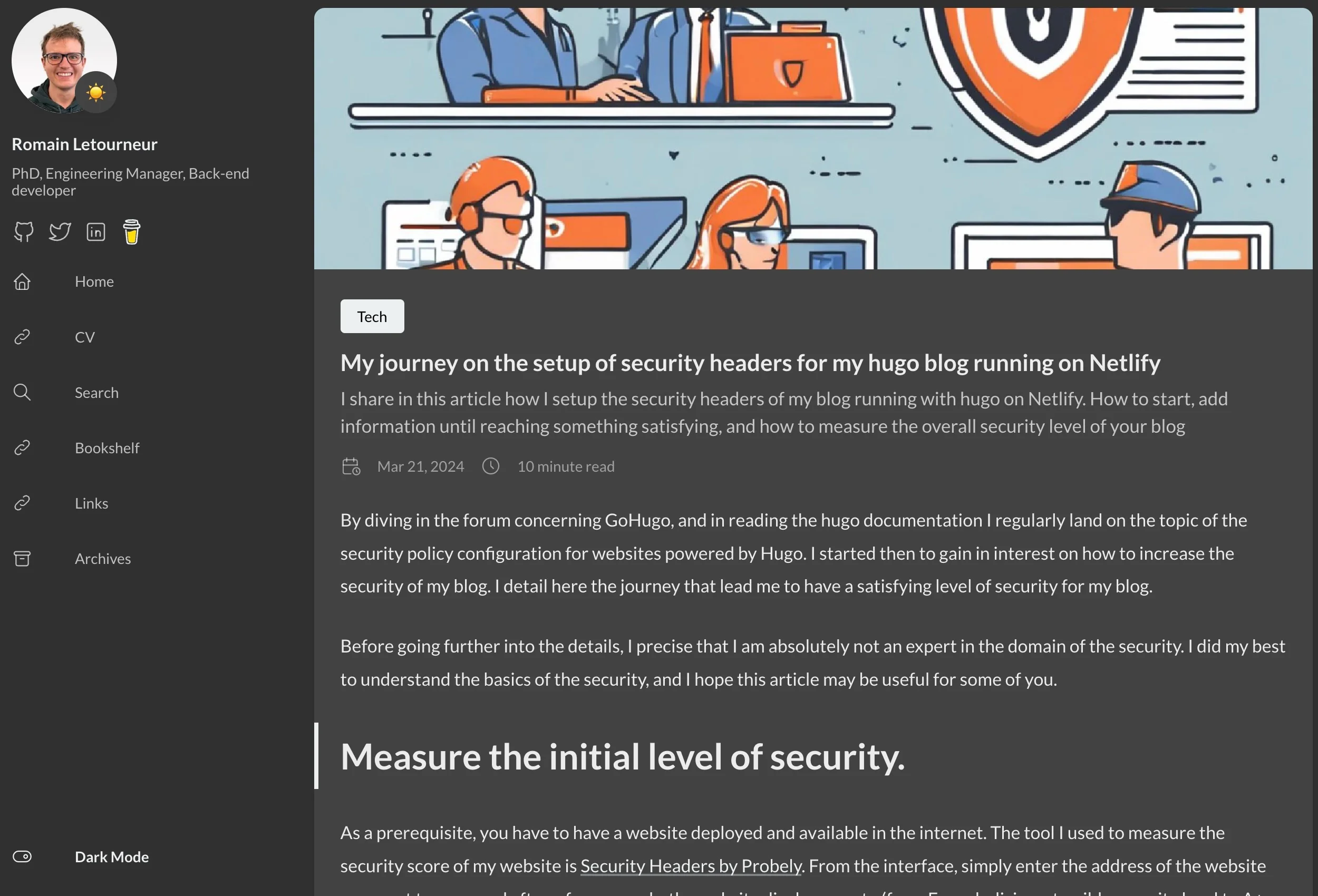 My blog, without the CSP header
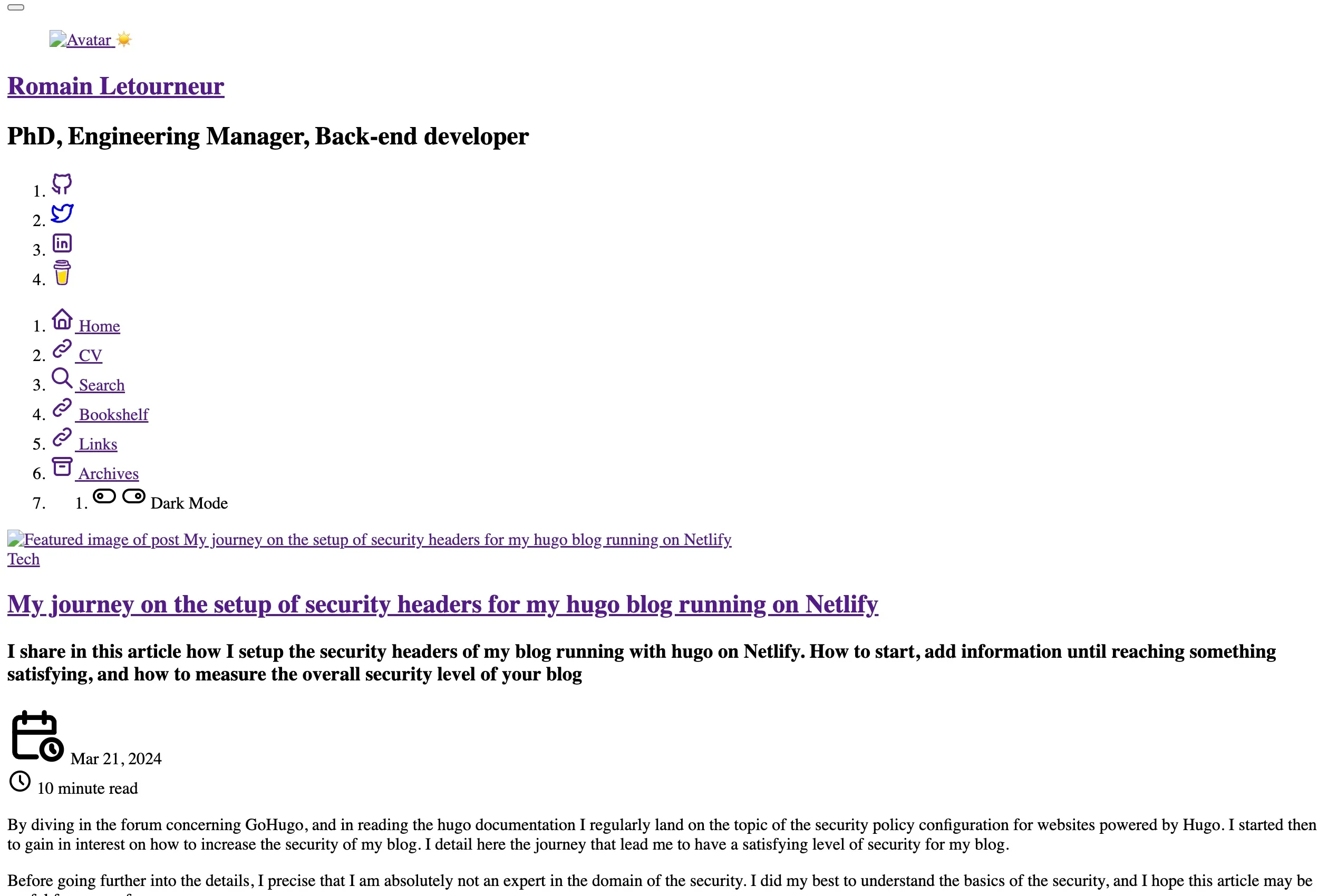 The same blog, after adding the CSP header
The console was flooded with error logs.
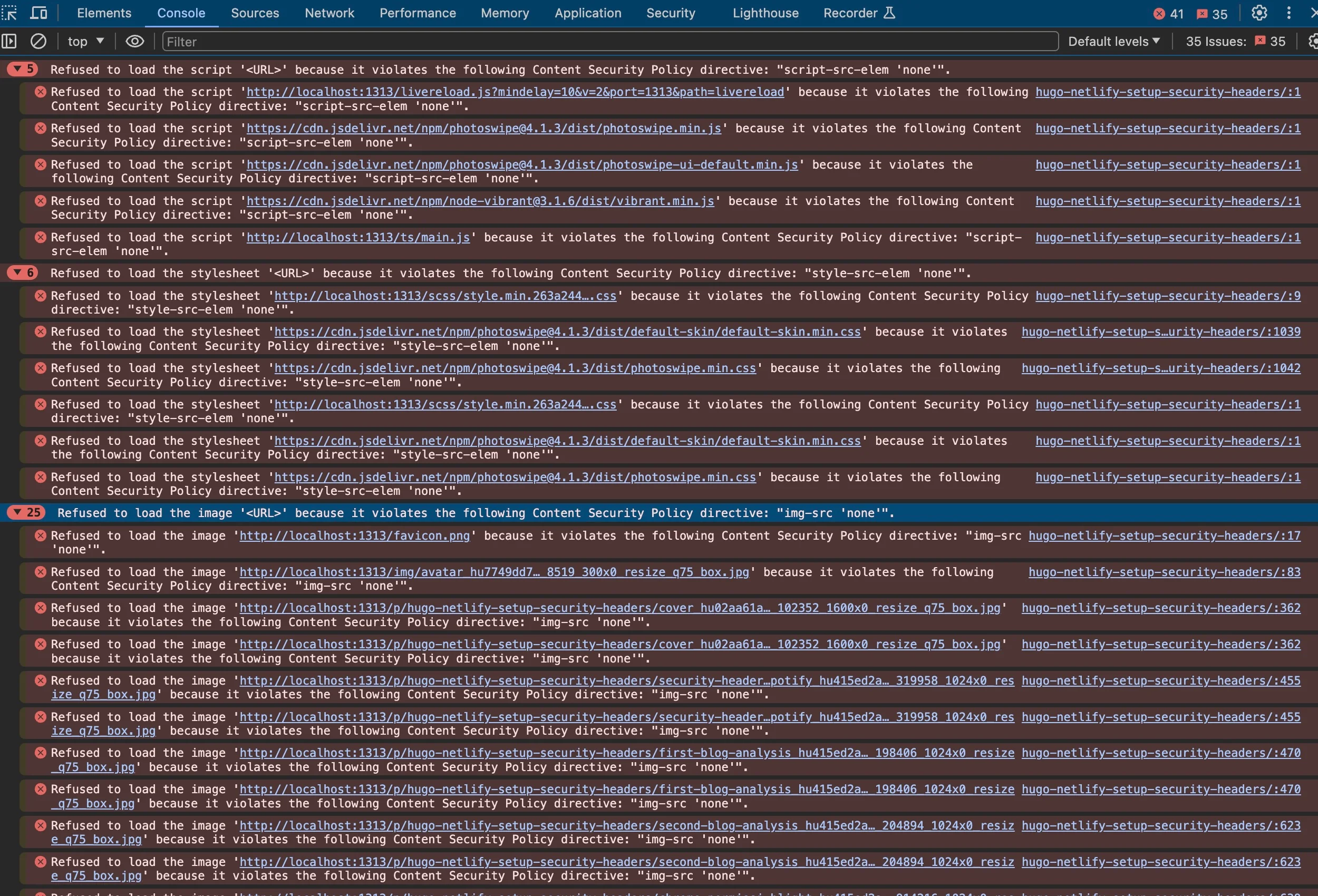 Google Chrome console displays error for a Content Security Policy with all fields set to ‘none’
We must now resolve these errors one by one.
In http://localhost:1313/p/hugo-netlify-setup-security-headers/
Refused to load the script 'http://localhost:1313/livereload.js?mindelay=10&v=2&port=1313&path=livereload'
because it violates the following Content Security Policy directive: "script-src-elem 'none'".
This error blocks the script because script-src-elem forbids execution. This specific script is for Hugo’s live reload. Since this is only used locally, I add localhost:1313/livereload.js only in development/config.toml.
Here are common cases you will likely encounter:
Case 1: style-src-elem errors
Refused to load the stylesheet 'http://localhost:1313/scss/path_to_file.css'
because it violates the following Content Security Policy directive: "style-src-elem 'none'".
Solution: Replace 'none' with 'self'. This allows stylesheets from the same origin. Do not use absolute URLs like http://localhost:1313... in the production config, as they won’t work once deployed.
Case 2: img-src errors
Refused to load the image 'http://localhost:1313/favicon.png'
because it violates the following Content Security Policy directive: "img-src 'none'".
Solution: Similar to styles, replace 'none' with 'self' in the img-src section.
Case 3: External Scripts
Refused to load the script 'https://domain/path_to_file.js'
because it violates the following Content Security Policy directive: "script-src-elem http://localhost:1313".
Solution: Append the domain to the allowed list (e.g., script-src-elem 'self' https://domain/path_to_file.js).
Case 4: Inline Scripts (The Tricky Part)
Refused to execute inline script...
Either the 'unsafe-inline' keyword, a hash ('sha256-...'), or a nonce ('nonce-...') is required to enable inline execution.
Three solutions exist:
-
Unsafe-inline: Often affectionately called the “path of least resistance.” It globally allows any inline script. I strongly discourage this. Read this article to understand why.
-
Hashes: You add the specific hash provided in the error log to your CSP. This works well for static scripts but fails for dynamic content (like comments sections that change per page).
-
Nonces: Ideally suited for dynamic content. You generate a random string (nonce) and add it to the
<script>tag. I created a Go script to help generate these, available here.
Note: GitHub Gists and Hugo shortcodes often rely on inline styles/scripts, making them hard to use without unsafe-inline. I switched from Disqus (comments) to a self-hosted solution named Remark42 to maintain a strict CSP.
For further testing, I recommend csp-evaluator.withgoogle.com.
Final Word
Not that easy, right?
I pushed this exercise quite far, aiming for maximum security. However, security is a spectrum. Depending on your project’s criticality, you can adjust the slider. It is essential to guarantee a certain level of trust for your visitors, but you may choose to relax some constraints (particularly regarding CSP) to balance security, functionality, and maintainability.
I personally aim for that sweet spot: a high security level with a reasonable investment of energy.
Sources
For more on CSPs, see my [[article on Hugo security headers]]. Addendum: Privacy Policy Even with privacy-friendly tools, transparency is key. I recommend drafting a privacy policy inspired by...
Pour en savoir plus sur les CSP, voir mon [[article sur les en-têtes de sécurité Hugo]]. Addendum : Politique de Confidentialité Même avec...