
Mastering Hugo Sitemaps: How to Exclude Pages and Improve SEO
In this post, I will explain what a sitemap is, how it is used, and how Hugo handles it by default. Then, I will show you why it is beneficial to override this default behavior and guide you through the process of customizing it.
What is a sitemap?
A sitemap is an XML file, typically located at the root of a website, that lists the pages the site contains.
 Sitemap structure diagram
The main purpose of this file is to help search engines like Bing, DuckDuckGo, and Google understand your website structure. It tells them which pages exist and provides metadata about them, such as the last modification date or the changefreq (how often you update the content: daily, weekly, monthly, etc.).
You can check the sitemap file of most websites by appending /sitemap.xml to their base URL. For example, my blog’s sitemap is accessible here: https://blog.laromierre.com/sitemap.xml. The structure looks like this:
<urlset xmlns="http://www.sitemaps.org/schemas/sitemap/0.9" xmlns:xhtml="http://www.w3.org/1999/xhtml">
    <url>
        <loc>https://blog.laromierre.com</loc>
        <lastmod>2024-03-21T13:03:30+01:00</lastmod>
        <changefreq>daily</changefreq>
    </url>
    <url>
        <loc>https://blog.laromierre.com/p/practical-guide-to-enhance-hugo-sitemap</loc>
        <lastmod>2024-04-06T15:08:49+02:00</lastmod>
        <changefreq>daily</changefreq>
    </url>
    ...
</urlset>
Larger websites often use a Sitemap Index. For example, Backmarket’s sitemap (https://backmarket.com/sitemap.xml) acts as a parent file that links to other categorized sitemaps:
<sitemapindex xmlns="http://www.sitemaps.org/schemas/sitemap/0.9">
    <sitemap>
        <loc>https://www.backmarket.com/sitemap_products_1.xml</loc>
    </sitemap>
    <sitemap>
        <loc>https://www.backmarket.com/sitemap_general.xml</loc>
    </sitemap>
    ...
</sitemapindex>
If you visit one of these links, you will land on a standard XML file containing thousands of URLs.
How does it work in Hugo?
It’s pretty straightforward: when you build your website using the hugo command, the sitemap is generated automatically. If you take a look at the public/ folder after the build, you will see a sitemap.xml file.
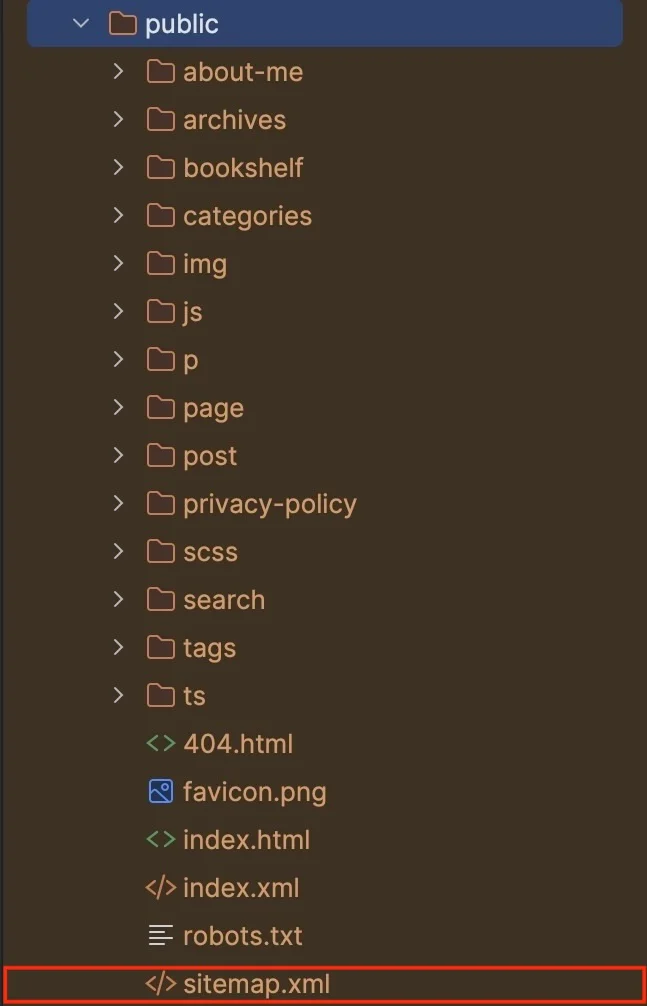 The file named “sitemap.xml”, in the public folder
You can define the general behavior for your website by adding the following configuration to your hugo.toml (or config.toml) file:
[sitemap]
changeFreq = "monthly"
priority = 0.5-
changeFreq: Hints at how frequently the page is likely to change. Values include
always,hourly,daily,weekly,monthly,yearly, andnever. -
priority: Sets the priority of this URL relative to other URLs on your site (valid values range from 0.0 to 1.0).
For more details, check the official documentation.
Overriding configuration per page
You can override these global settings in the frontmatter of specific files. For instance, if your site is generally updated monthly, but you have a specific page that updates daily, you can configure it like this:
In hugo.toml:
[sitemap]
changeFreq = 'monthly'
In the page frontmatter:
+++
slug = 'a-page-refreshed-daily'
[sitemap]
changeFreq = 'daily'
+++
How to exclude URLs from the sitemap
The first thing you might notice when inspecting your sitemap.xml is that Hugo generates an entry for everything. You might even discover pages you didn’t know existed.
Here is a typical Hugo project structure:
my-site/
├── content/
│   ├── categories/  <-- Taxonomies
│   ├── pages/
│   └── posts/
└── ...
If you have a website with just two pages, two posts, two categories, and two tags, how many URLs end up in your sitemap?
-
5 URLs you expect: Homepage, 2 posts, 2 pages.
-
10 URLs you might not want:
-
2 Category pages (lists of posts in a category).
-
4 Tag pages (lists of posts per tag).
-
1 Section list for Posts.
-
1 Section list for Pages.
-
1 Section list for Categories.
-
1 Section list for Tags.
-
In this scenario, twice as many internal navigation pages are indexed compared to actual content pages. For SEO, you generally want to exclude “thin content” pages like archives, internal search results, or redundant taxonomy lists.
So, how do we clean this up?
The Modern Way (Hugo v0.124.1+)
Since Hugo v0.124.1 (released in March 2024), excluding pages is native and simple. You no longer need custom layouts.
Simply add the following to the frontmatter of any page you want to hide:
+++
[sitemap]
disable = true
+++
Handling Taxonomies (Tags and Categories)
To exclude generated pages that don’t have a markdown file (like /tags/ or /categories/some-category/), you need to create an index file for them.
Note: In Hugo, section bundles typically use _index.md.
For example, to exclude the tag page for myTag, create the file content/tags/myTag/_index.md:
+++
title = "My Tag"
[sitemap]
disable = true
+++
To exclude the entire list of posts (e.g., baseurl/posts/), create content/posts/_index.md:
+++
title = "Posts"
[sitemap]
disable = true
+++
For Legacy Hugo Versions (≤ v0.124.1)
If you are still running an older version of Hugo, I highly recommend upgrading. However, if you cannot, here is the workaround.
You must override the default sitemap template.
-
Create a file at
layouts/_default/sitemap.xml. -
Copy the original Hugo sitemap template code.
-
Modify the loop to filter out pages where we set a custom parameter.
Find this line:
{{ range .Data.Pages }}Replace it with:
{{ range where .Pages ".Params.Sitemap.Disable" "ne" true }}Now, adding [sitemap] disable = true to your frontmatter will work even on older versions.
Conclusion
We’ve covered what a sitemap is and how to fine-tune it in Hugo. Keeping your sitemap clean helps search engines focus on your high-value content rather than getting lost in taxonomy lists. I hope this guide helps you optimize your site’s SEO! 😇
...ries); - For Terms (for every specific tag and category). As I mentioned in my post...